GitHub Comments
How FlagShark comments on your pull requests to provide flag visibility to your team.
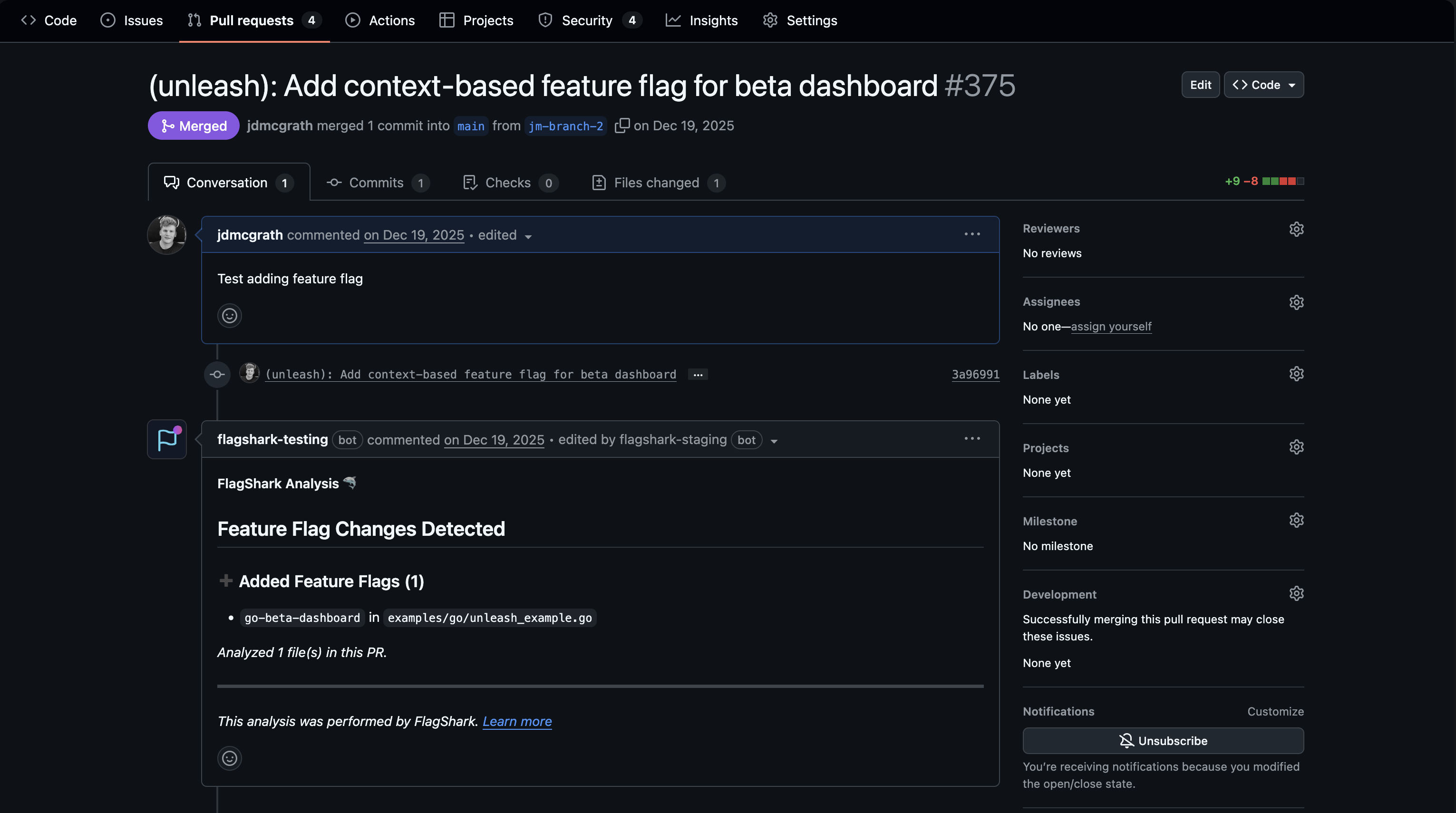
When FlagShark detects feature flag changes in a pull request, it automatically posts a comment summarizing all flags added or removed. This gives reviewers immediate visibility into flag changes without leaving GitHub.
Comment Overview
FlagShark's PR comment includes:
- A header showing the total number of flag changes
- A table of added flags (Flag, File, Line, Language)
- A table of removed flags (Flag, File, Line, Language)
- A collapsible analysis details block (files analyzed, files skipped)
- A powered-by footer
Comment Structure
Header
The comment header shows the total number of flag changes detected:
## 🦈 FlagShark — 3 Feature Flag Changes
If no changes are detected the header reads ## 🦈 FlagShark — No Feature Flag Changes.
Flag Tables
Added and removed flags each get their own section with a markdown table:
### Added (2)

| Flag | File | Line | Language |
|------|------|------|----------|
| `enable-new-checkout` | `src/checkout/PaymentForm.tsx` | 42 | TypeScript |
| `show-upsells` | `src/checkout/Upsells.tsx` | 15 | TypeScript |

### Removed (1)

| Flag | File | Line | Language |
|------|------|------|----------|
| `enable-legacy-api` | `src/api/client.ts` | 88 | TypeScript |
The columns are:
| Column | Description |
|---|---|
| Flag | The flag key, as a code literal |
| File | The file path where the flag appears |
| Line | The line number |
| Language | The programming language FlagShark detected |
Analysis Details
A collapsible <details> block at the bottom shows how many files were analyzed and, if any, how many were skipped.
Footer
Every comment ends with:
*Powered by [FlagShark](https://flagshark.com)*
Comment Updates
FlagShark uses a single sticky comment per PR. When you push new commits, FlagShark re-analyzes the updated diff and silently edits the existing comment in place; it does not post a new comment. The stickiness is driven by a hidden HTML marker (<!-- flagshark -->) at the start of the comment body; the manager searches for this marker to locate the existing comment. The comment body itself begins with <!-- flagshark-pr-comment --> (written by the formatter), which is a separate internal marker.
Triggering a Re-Analysis
Push a new commit to the PR (or amend/force-push). FlagShark re-analyzes on every pull_request: synchronize event from GitHub and updates the existing comment in place.
Dismissing False Positives
To exclude a file or pattern that's producing a false positive, add it to your .flagshark.yml exclude list. See Configuration.
Comment Permissions
FlagShark needs write access to post comments. If comments aren't appearing:
See Permissions for detailed troubleshooting.
Notification Integration
When FlagShark comments, GitHub's standard notification rules apply:
- PR author is notified
- Reviewers subscribed to the PR are notified
- Anyone @mentioned is notified
Comment Examples
Typical PR Comment
<!-- flagshark-pr-comment -->
## 🦈 FlagShark — 3 Feature Flag Changes

### Added (2)

| Flag | File | Line | Language |
|------|------|------|----------|
| `enable-new-checkout` | `src/checkout/PaymentForm.tsx` | 42 | TypeScript |
| `show-upsells` | `src/checkout/Upsells.tsx` | 15 | TypeScript |

### Removed (1)

| Flag | File | Line | Language |
|------|------|------|----------|
| `enable-legacy-api` | `src/api/client.ts` | 88 | TypeScript |

<details>
<summary>Analysis details</summary>

- Files analyzed: **24**
</details>

---
*Powered by [FlagShark](https://flagshark.com)*
No-Changes Comment
When a PR touches files that import a flag SDK but introduces no net flag changes:
<!-- flagshark-pr-comment -->
## 🦈 FlagShark — No Feature Flag Changes

No feature flag changes detected in this PR.

<details>
<summary>Analysis details</summary>

- Files analyzed: **8**
</details>

---
*Powered by [FlagShark](https://flagshark.com)*
Related Documentation
- Activity Feed - Track all flag activity
- Flag Detection - How detection works
- Permissions - Comment permission issues